Baby Story: A Playful Font for Design Projects That Capture Attention
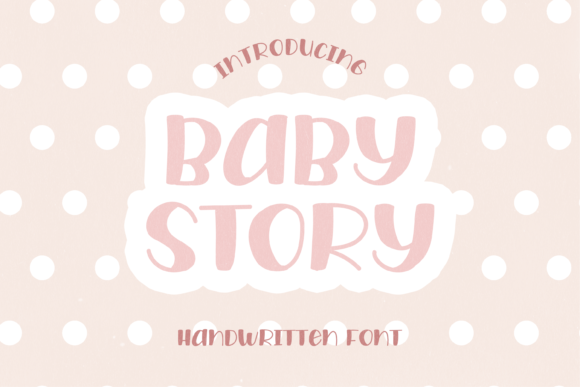
Baby Story is a children's display font that brings a sense of innocence, joy, and youthful energy to any design. With its rounded edges, soft curves, and friendly appearance, Baby Story is more than just a typeface—it’s a tool that can transform the way messages are received and remembered. Whether you're designing a logo, crafting marketing materials, or creating content for kids, this font adds an instant visual appeal that resonates with audiences of all ages.
Designed with readability and charm in mind, Baby Story fits seamlessly into a wide range of creative workflows. Its versatility allows it to be used across digital and print media, making it a valuable asset for designers, marketers, educators, and entrepreneurs looking to add a touch of personality to their projects.
Understanding the Role of Baby Story in Design Workflows
Before diving into specific use cases, it’s important to understand where Baby Story fits within a broader design process. As a display font, it’s best suited for headlines, titles, and call-to-action elements rather than body text. This makes it ideal for situations where visual impact matters most—such as branding, advertising, and educational materials aimed at younger audiences.
Incorporating Baby Story early in the design phase can help establish the tone and personality of a project. For instance, if you're developing a children's book or a website for a toy brand, using Baby Story from the outset ensures consistency and reinforces the playful theme throughout the design.
During the execution phase, Baby Story interacts well with other design tools such as Adobe Photoshop, Illustrator, Canva, and Figma. It pairs beautifully with bright colors, illustrations, and playful graphics, allowing for a cohesive and eye-catching final product.
Practical Use Cases for Baby Story
Baby Story is not limited to just one type of project. Here are some practical scenarios where this font can make a meaningful difference:
- Branding and Logo Design: The font's friendly and approachable look makes it perfect for logos targeting families, children's products, or educational institutions. Pairing it with simple shapes and warm color schemes can create a memorable brand identity.
- Marketing Materials: Use Baby Story in promotional posters, flyers, or social media posts to grab attention. It works especially well for campaigns focused on family, play, or childhood development.
- Children's Content: From storybooks to learning apps, Baby Story enhances the reading experience by making text feel more engaging and less intimidating for young readers.
- Event Invitations and Party Themes: Whether it's a birthday party, baby shower, or school event, Baby Story adds a charming aesthetic that aligns perfectly with the celebratory spirit.
- Educational Resources: Teachers and educators can use Baby Story in worksheets, flashcards, and classroom presentations to make learning more enjoyable and visually stimulating for students.
How to Integrate Baby Story into Your Workflow
Integrating Baby Story into your workflow requires a few considerations to ensure it complements the overall design without overwhelming it. Here are some tips for smooth integration:
- Start with Purpose: Define the goal of your project before selecting Baby Story. Ask yourself whether the font will enhance the message or distract from it. It should serve a clear purpose, such as drawing attention to a headline or reinforcing a brand's playful identity.
- Test Compatibility: Ensure that Baby Story works well with other fonts you plan to use. While it's excellent for headlines, pairing it with a clean sans-serif font for body text often yields the best results.
- Experiment with Layouts: Try different layouts and spacing to see how Baby Story performs in various contexts. Sometimes adjusting the size, weight, or color can dramatically change how the font is perceived.
- Use in Layers: If you're working digitally, consider layering Baby Story over background images or illustrations. This can create depth and dimension, making the text stand out even more.
- Consider Accessibility: While Baby Story is great for visual appeal, always ensure that the text remains readable. Avoid using it in small sizes or on low-contrast backgrounds, which can reduce legibility.
Tips for Long-Term Use and Quality Control
When using Baby Story consistently across multiple projects, maintaining quality control becomes essential. Here are a few strategies to keep your designs polished and professional:
- Create Style Guides: Develop a style guide that outlines how Baby Story should be used in different contexts. This helps maintain consistency across all projects and reduces the risk of misuse.
- Store Fonts Organized: Keep your font library well-organized so you can easily access Baby Story when needed. Many design platforms allow you to categorize fonts based on use case, which can streamline your workflow.
- Update Regularly: If Baby Story is part of a larger brand system, update it periodically to ensure it aligns with current trends and standards. This also helps prevent outdated designs from being reused unnecessarily.
- Get Feedback: Share your work with colleagues or clients to get feedback on how Baby Story is performing in different contexts. Their insights can help you refine your usage and improve future projects.
Final Thoughts on Using Baby Story Effectively
Baby Story is more than just a font—it's a creative tool that can elevate the emotional impact of your designs. By understanding its strengths and limitations, you can integrate it effectively into your workflow and achieve outstanding results. Whether you're working on a small personal project or managing a large-scale design initiative, Baby Story offers a unique opportunity to connect with your audience in a meaningful way.
As you continue to explore its potential, remember to experiment, stay consistent, and always prioritize clarity and purpose. With the right approach, Baby Story can become a trusted companion in your creative journey, helping you produce designs that are both visually appealing and emotionally resonant.